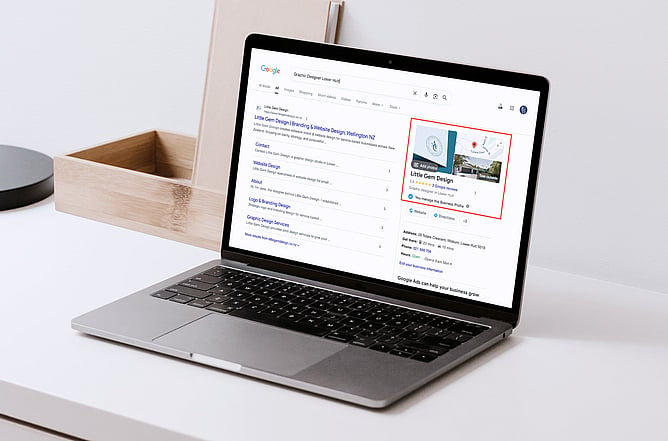
If you run a small business, one of the easiest and most effective ways to improve your online presence is by setting up a Google Business Profile. It’s free, relatively simple to manage, and can make a big difference in how potential customers find and trust your business online.
Whether you’re a local tradie, café owner, consultant, retail shop, or service-based business, having a Google Business Profile helps people discover your business when they search on Google or Google Maps.
What is a Google Business Profile?
A Google Business Profile is a free business listing that appears on Google Search and Google Maps when people search for a business, product, or service. It provides potential customers with key information about your business, including your business name, location, phone number, website, opening hours, photos, and customer reviews. For many people, it is one of the first things they see before visiting a website or making contact.
For example, if someone searches for “graphic designer near me” or “best café in Wellington,” Google will often display a selection of local businesses that match the search. This allows users to quickly compare businesses, read reviews, get directions, or contact a business directly from the search results. A Google Business Profile essentially acts like a mini website within Google and plays an important role in helping small businesses improve their visibility online.
Where can you find a Google Business Profile?
You’ve probably already seen Google Business Profiles without realising it. They usually appear in Google Search results or inside Google Maps when people search for a business or service. On desktop, they often appear on the right-hand side of the page, while on mobile, they are usually displayed near the top of the search results.
You can manage your own profile by searching your business name while logged into your Google account, or by visiting: Google Business Profile.
Why is a Google Business Profile important?
It helps customers find you
Many people search online before choosing a business. A Google Business Profile improves your chances of appearing in local search results and on Google Maps, making it easier for potential customers to discover your business.
It builds trust
When people can quickly see reviews, photos, contact details, and accurate business information, it helps create a strong first impression. A complete and professional-looking profile helps your business appear more credible and trustworthy.
It improves your SEO
A Google Business Profile can help your business appear higher in local search results, even if your website is relatively new. Google uses profile information, reviews, and location data to help determine which businesses appear in local searches.
It makes contact easy
Customers can contact your business directly from your profile by calling, visiting your website, getting directions, or reading reviews. This creates a quick and convenient experience for potential customers.
It’s free marketing
One of the biggest benefits is that it’s completely free to set up. A well-maintained Google Business Profile can continue attracting customers over time without the ongoing cost of paid advertising.
How to set up a Google Business Profile
Step 1: Sign In to Google
You’ll need a Google account to get started. It’s best to use a business email address if possible.
Go to: Google Business Profile setup page
Step 2: Add your business
Enter your business name and choose the category that best describes your business. Choosing the right category helps Google understand what your business offers and when to show your profile in search results.
Step 3: Add your location or service area
If customers visit your premises, you can add your physical address. If you travel to customers instead, you can choose a service area rather than displaying your address publicly.
Step 4: Add your contact information
Include your phone number and website link so customers can easily contact you. It’s important to keep this information consistent with your website and social media pages.
Step 5: Verify your business
Google will ask you to verify that you own the business. This may happen through email, phone, postcard, or video verification. Verification helps confirm that your business is legitimate.
Step 6: Complete your profile
Once verified, spend some time completing your profile properly. Add a business description, opening hours, services, photos, and your logo. Businesses with complete profiles generally perform better in search results and appear more professional to potential customers.
Step 7: Ask for reviews
Customer reviews are one of the most valuable parts of a Google Business Profile. Positive reviews help build trust and can improve your visibility in local searches. Even a simple follow-up email after completing a job can encourage customers to leave a review.
Tips for keeping your profile active
A Google Business Profile works best when it’s kept up to date. Try to regularly check that your contact details, opening hours, and services are accurate. Adding new photos occasionally and responding to reviews can also help keep your profile active and engaging.
An updated profile signals to both Google and potential customers that your business is active, professional, and reliable.
A Google Business Profile is one of the simplest and most effective ways to improve your online visibility and help potential customers find and trust your business. It’s free, easy to maintain, and especially valuable for small businesses wanting to strengthen their local online presence. If you already have a website, a Google Business Profile works alongside it to help more people discover your business online.